
Google Ad Grants can be a valuable tool for nonprofit organizations to increase visibility and reach their target audience. However, managing an Ad Grant can be a daunting task, especially if you are new to digital advertising or wear many hats. To make the most of this program, it’s important to avoid common mistakes that can waste budget or make it hard to actually use the available $10,000 budget.
Let’s have a look at 10 common Google Ad Grant mistakes we’ve identified and how to avoid them.
1. Failing to meet Google’s Ad Grants compliance policy
Google has strict requirements for ad quality, relevancy, and user experience. To avoid running afoul of these requirements and to not risk account suspension, be sure to comply with the following rules:
- Don’t run single-word keywords(except for these), extremely generic keywords, or keywords with a quality score of 1 or 2
- Maintain an account-level average click-through-rate (CTR) of 5% each month
- Accurate and meaningful conversion tracking must be implemented
- The account must maintain at least:
- One responsive search ad per ad group
- Two ad groups per campaign
- Two sitelinks
- Campaigns must target specific geo’s – make sure to only target locations in which you want to promote your organization
- Respond to program survey when inquired, typically you’ll receive notification of this survey once a year
Furthermore, to ensure that your Google Ad Grant account remains active, it’s important to log in at least once a month and make changes every few months. This helps Google recognize that you’re actively using the account. If you don’t spend any funds on the account for a certain period of time, it may be deactivated, and reactivating it can be a cumbersome process. Therefore, it’s crucial to keep utilizing the Ad Grant to maintain your account’s functionality.
2. Using broad or generic keywords that don’t align with the organization’s mission or goals
When choosing keywords, it’s important to be specific and relevant to your organization’s mission and goals. Avoid using broad or generic keywords that may attract irrelevant traffic. This can lead to a low click-through rate, low conversion rate, and ultimately a waste of advertising budget. By using more specific and relevant keywords, the organization can attract qualified traffic that is more likely to convert and contribute to the organization’s goals.
3. Ignoring negative keywords, which can help filter out irrelevant traffic and save budget
Negative keywords are an essential tool for filtering out irrelevant traffic and saving budget. Be sure to use negative keywords to exclude terms that are not relevant to your organization. You can add negative keywords at the account, campaign or ad group level. It’s a good practice to add negative keywords regularly. You can also use negative keyword lists to manage negative keywords across multiple campaigns or accounts.
To find new potential (negative) keywords you can use the search query report. The search query report provides a list of search terms that people have used to trigger your ads in a search engine advertising campaign. By reviewing this report, you can identify which search terms are not relevant to your campaign and add them as negative keywords.
4. Too narrow targeting causing low search volume
Narrow targeting of keywords and geographic locations in Google Ads campaigns can lead to low search volume, as it limits the number of potential users who could see the ad. When targeting only a specific group of keywords or geographic locations, there may not be enough search volume to generate significant impressions or clicks. To avoid this issue, it’s essential to broaden the scope of keyword and geographic targeting while still ensuring that the ads reach the intended audience. Experimenting with different targeting strategies and continually monitoring the campaign’s performance can help to strike a balance between precision and reach.
5. Failing to implement conversion tracking or set up goals to measure success
Conversion tracking is critical to measuring the success of your Ad Grant campaigns. Be sure to set up goals and track conversions to ensure that your campaigns are driving the desired outcomes.
Some conversion events that could be interesting for your nonprofit are:
- Donations: Track when users make a donation, and which campaigns or ads are driving the most donations.
- Volunteer sign-ups: If your nonprofit relies on volunteer support, track when users sign up to volunteer.
- Event registrations: If your nonprofit hosts events, track when users register for an event.
- Newsletter sign-ups: If you have a newsletter or mailing list, track when users sign up to receive updates through your website.
- PDF downloads: If your organization uploads PDF’s, track when users download a specific file and gain insight into which publications are most popular.
- Social media shares: If you have social media profiles, track when users share your content on social media.
- Time on site: Track how long users spend on your website, which pages they visit, and which campaigns or ads are driving the most engagement.
- Contact form submissions: If you have a contact form on your website, track when users submit the form and which campaigns or ads are driving the most inquiries.
6. Not using smart bid strategies, enabling you to exceed the $2 max CPC bid limit
Using smart bid strategies in a Google Ad Grants account can be highly beneficial. Smart bid strategies leverage machine learning and automation to help optimize your bidding strategy and get the most out of the Ad Grants budget. With smart bidding, the system automatically adjusts bids to ensure that the ad is shown to the most relevant audience and at the most effective time, all while working towards the advertiser’s specific goals, such as maximizing conversions or achieving a target return on ad spend (ROAS). By utilizing smart bid strategies, nonprofit organizations can save time and effort, increase campaign performance, and ultimately maximize the impact of their Ad Grants budget. Besides these major benefits, using smart bid strategies allow you to exceed the max. CPC bid limit of $2 within the Google Ad Grant program, which in return will enable your ads to enter more auctions and subsequently utilize a larger part for the available $10,000 budget.
7. Failing to leverage Responsive Search Ads
Responsive search ads (RSA) are an ad format in Google Ads that allow advertisers to create ads with multiple headlines (max. 15) and descriptions (max.4). The system then uses machine learning to dynamically serve the most relevant combination of headlines and descriptions to users based on their search queries, search intent, and other contextual factors.
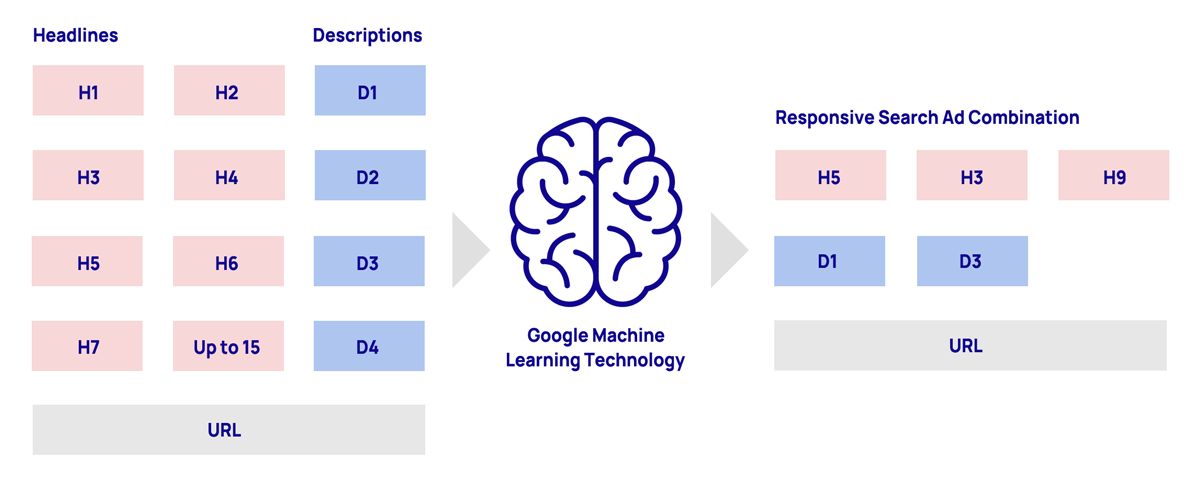
To get the most out of RSA’s, it’s essential to provide a variety of high-quality headlines and descriptions for the system to choose from. Ensure that you include relevant keywords, highlight unique value propositions, and use a clear call-to-action to encourage engagement.
As a best practice we aim to create one RSA per ad group, leveraging at least 10 headlines and four descriptions. Using more assets allows Google to test a greater variety of ad combinations for different types of users. This will allow your ads to enter more auctions and as such show more often. In addition, we recommend using pinning only when required by brand guidelines. By pinning headlines in fixed positions, you’re limiting Google’s ability to test ad combinations, which tends to have the reverse effect of aforementioned.
8. Failing to use ad extensions
Ad extensions are a powerful tool for providing additional information and enhancing the appearance of your ads. Be sure to take advantage of all available and relevant ad extensions to improve the performance of your campaigns. Extensions that are often used across all campaigns are sitelinks and callout extensions.
9. Expecting immediate results and only going after budget utilization
It’s important to keep in mind that Google Ad Grants are a long-term marketing strategy, and you cannot expect immediate results. It takes time to optimize your campaigns, and it’s essential to analyze the data continually, tweak the targeting, and adjust the bidding strategy to ensure that your ads are performing optimally.
Also, it’s crucial to focus on achieving your marketing objectives instead of just aiming to use the entire $10,000 monthly budget. Focusing solely on using up the entire budget can result in wastage of the funds on irrelevant clicks and ultimately harm your campaign’s overall performance. Instead, set measurable goals for your campaigns, such as generating more donations or increasing relevant website traffic, and work towards achieving them by optimizing your campaigns and leveraging best practices in Google Ads.
10. Failing to use data and insights to continuously improve campaigns and achieve better results
The Google Ads landscape is constantly evolving, and data and insights are critical to improving the performance of your campaigns over time. Be sure to analyze data and make adjustments to your campaigns to achieve better results. We recommend logging in at least once a week to check in on campaign performance and goal progression.
Final thoughts
Managing a Google Ad Grant can be a challenging task, but by avoiding these common mistakes, we hope your nonprofit can make the most of this valuable program. By creating high-quality ads, targeting relevant keywords and geo’s, using negative keywords, and leveraging all available features such as bid strategies and extensions, you can achieve better results and make a bigger impact on your mission.
Curious to see where your grants account stands?
Sign up for a free Account Audit and gain actionable insights to help you understand what’s working and where you can improve.
